Tower Craft: Build Skyscraper
- 4.4
- Rating
- 50.00M
- Installs
- Free
- Price
 Analysis by App-foxy
I first picked up Tower Craft: Build Skyscraper expecting a simple stacking game, and that is exactly where its appeal begins. The idea is easy to understand: place blocks one above another and keep extending a tower upward. Yet the short sessions make each attempt feel like a small test of timing, patience, and recovery. I can play for a few minutes while waiting for an appointment, then stop without feeling that I have abandoned a complicated campaign.
That simplicity also makes it an interesting choice for a shared phone or tablet. Someone in the household can hand it over and explain the goal almost immediately. There is no long story to follow, no large collection of controls to learn, and no need for a group to be online at the same time. In my experience, it works best as a quick pass-and-play distraction rather than as a deep strategy title.
How the tower works in everyday play
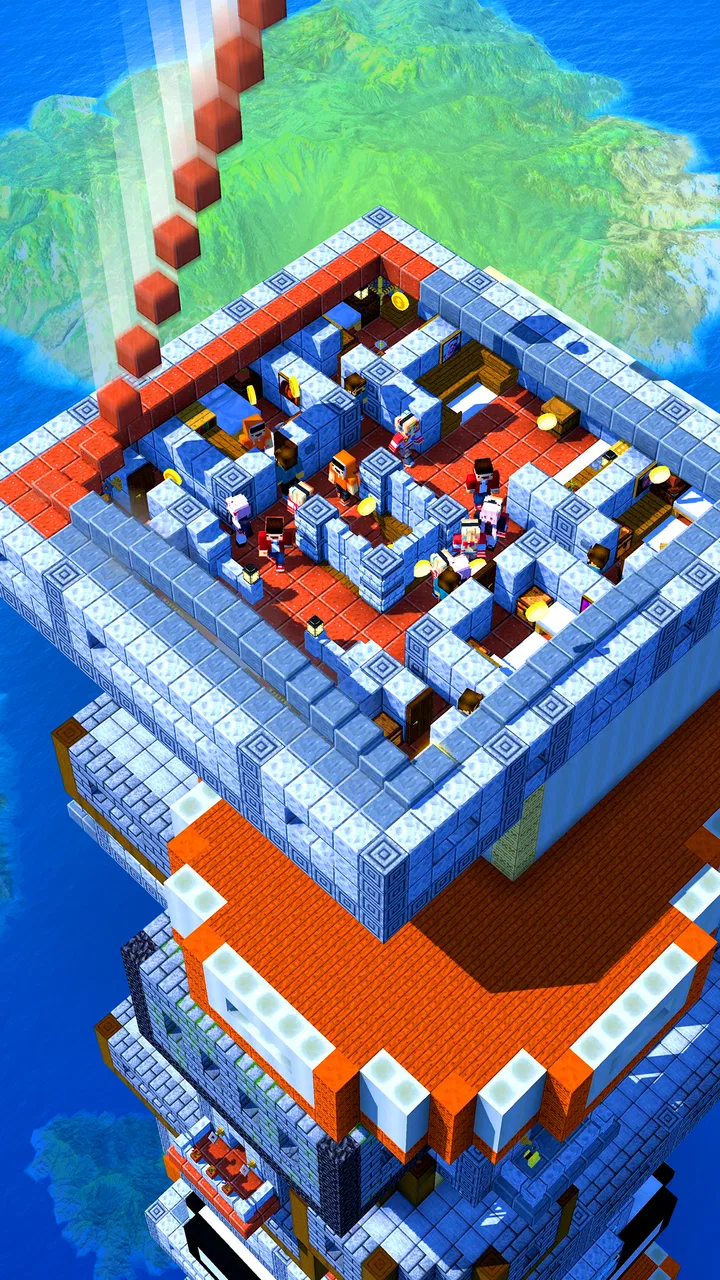
The central challenge is keeping the building aligned as it grows. Each placement affects the shape of the next section, so careless movement early in a run can make later blocks harder to position. I found that the most useful habit is to stop treating every placement as a race. Watching the movement for a moment and waiting for a comfortable alignment usually produces a better tower than tapping as quickly as possible.
You May Also Like

 Pandora - Music & Podcasts
Pandora’s Music Is Easy to Start, but Harder to Recover
Pandora’s strength is its low-effort path from a seed to a station. Its weak spot is how much confidence it asks you to place in connection, setup, and quiet recovery.

 AccuWeather: Weather Radar
AccuWeather Review: A Quick, Clear Forecast for Everyday Decisions
For everyday plans, the best forecast is the one you can understand quickly. AccuWeather makes rain timing, radar, and local conditions easy to act on, with a few trade-offs.

 Hill Climb Racing
Why Hill Climb Racing Still Turns Crashes Into One More Run
A tiny car, a bumpy hill and one more upgrade: Hill Climb Racing keeps resurfacing because its simple chaos makes every near-miss feel personal.

 AliExpress - Shopping App
AliExpress Makes Global Shopping Feel Personal, but Shoppers Bear the Risk
AliExpress turns a global marketplace into a pocket-sized discovery engine. Its reach is useful, its shopping loop compelling, and its trade-offs easy to miss.

 Lords Mobile: Kingdom Wars
Lords Mobile Is a Kingdom-Building Routine, Not a Quick Match
A case-by-case verdict on the building, battles, device demands, and social commitments that make Lords Mobile rewarding for some players and exhausting for others.

 PDF Scanner app - TapScanner
TapScanner Makes Paperwork Easier to Capture, Check, and Share
TapScanner makes scanning with a phone feel less like a rescue operation and more like a dependable step in getting work done. Its capture tools are useful, though not flawless.
More From Our News Desk
View All News


This is where the strategy label makes sense, although expectations matter. Tower Craft is a light strategy game built around immediate decisions, not a long-form management simulation. I am not balancing workers, researching technologies, or planning a city budget. Instead, I am managing risk one block at a time. The strategic question is simple but surprisingly effective: should I accept a slightly imperfect placement now, or wait for a better chance and risk losing the rhythm?
That decision gives the game more personality than its basic premise suggests. A neat lower section can create confidence, while a crooked placement can make me overcorrect on the next move. I learned to focus on maintaining a stable rhythm instead of chasing a perfect tower every time. This is a useful approach for younger players too, because it turns mistakes into visible feedback rather than hiding them behind complicated menus.
For a shared-device situation, I would use it in short turns. One person can make a few placements, pass the device, and let the next player continue or begin again. The game does not need a formal household competition to create that moment of coordination. Players can simply agree on a target height or decide who gets the next attempt. That informal structure is a strength, but it also means the fun depends on the people using it; the app itself is not a substitute for a built-in multiplayer experience.
Why short sessions suit a family device
On a household tablet, long games can create arguments over whose turn it is or how long someone has been playing. This one is easier to fit around ordinary routines. A child can try a run before dinner, a parent can play while waiting for a kettle to boil, and another person can take over later without needing to remember a complicated objective.
The trade-off is that a quick arcade-style loop may not hold everyone’s attention for long. A player who wants a campaign, character development, or a large map will probably find the experience too narrow. I would recommend it for people who enjoy repeating a focused action and gradually improving their control, not for anyone searching for a broad construction game.
One practical tip is to keep the device still and use a comfortable grip. Small movements are easier to judge when the screen is stable, especially on a larger tablet. I also prefer playing with notifications out of the way, because an interruption at the wrong moment can spoil a careful placement. These are ordinary habits, but they matter more here than in a turn-based game where a pause is harmless.
Setting boundaries before sharing the device
The game is free to download, which makes trying it with a household device straightforward. It includes in-app purchases ranging from $0.99 to $49.99 per item, so I would not hand it to a child on a payment-enabled device without first agreeing on how purchases are handled. That is not a criticism of the stacking mechanic itself; it is a sensible boundary whenever a free game offers optional spending.
I would explain the rule in plain language: playing is allowed, but buying anything requires asking first. On a shared phone, that conversation is more useful than assuming everyone understands the difference between a free download and optional purchases. If the device belongs to several people, each person should know whether the store account can complete a transaction and who is responsible for checking it.
The game is marked for Everyone, which fits its straightforward presentation and accessible premise. Still, an age label does not replace household judgement. Younger children may understand the tower challenge but not the meaning of an in-app purchase. I would let a child play independently only after checking the device’s purchase setup and making the family rule clear.
There is another boundary worth considering: personal progress. On a shared device, people may naturally take turns using the same game, but that does not automatically mean everyone has a separate record or personal space. I would avoid promising a child that a particular tower or achievement belongs exclusively to them unless the household has agreed on a way to track turns. A simple note, a spoken score, or a designated play session can prevent small disagreements.
This is especially relevant when several people enjoy the same challenge at different skill levels. A younger player may want to experiment, while an experienced player may be tempted to take over and chase a higher tower. The fairest arrangement is often to separate “practice turns” from “showcase turns.” That lets beginners try without pressure and gives confident players room to demonstrate technique without dominating the device.
Coordinating turns without making the game complicated
Tower Craft is well suited to informal coordination because its objective is visible from the screen. Nobody needs a long explanation before joining in. I would suggest agreeing on one of three simple formats: each player gets one attempt, each player gets a fixed amount of time, or everyone contributes to one shared run. The last option can be especially entertaining because every placement changes the situation for the next person.
A shared run also reveals an important trade-off. Passing a tower between players creates conversation, but it can make the next move harder if the previous player leaves an awkward alignment. That is not necessarily a flaw; it becomes part of the challenge. However, if the household wants a fair comparison of skill, separate attempts are better than one combined tower.
For younger players, I would encourage verbal planning rather than grabbing the device. Saying “wait for the block to come back” or “leave it a little wider” helps turn the game into a small lesson in observation. It also reduces the temptation for an older sibling or parent to intervene physically. The player still makes the decision, while the other person contributes advice.
For adults sharing a device, the main coordination issue is interruption. A quick game can look harmless, but a person who is concentrating may still want to finish a run. I find it helpful to ask whether the current attempt is over before taking the phone. That tiny courtesy matters because the game’s tension comes from continuity; stopping in the middle can feel more disruptive than its simple design suggests.
Another useful household arrangement is to keep the game in a common area rather than treating it as a private activity for one person. That makes spontaneous turns easier and avoids the impression that one player has permanent ownership of the app. At the same time, someone who prefers quiet practice should be allowed to play alone. Shared use works best when it remains an invitation, not an obligation.
What the developer’s approach gets right
CASUAL AZUR GAMES keeps the concept focused. The game does not bury the basic action under a large amount of explanation, and that makes the first session approachable. I could understand the goal quickly, but the growing tower still gave me a reason to retry after a poor placement. That balance is difficult to achieve in a very small game: it must be clear enough for a new player while offering enough tension to avoid feeling completely automatic.
The broad audience is reflected in its reach. The game has an average rating of 4.4 from around 246 thousand ratings and has passed 50 million installs. Those figures do not guarantee that every player will enjoy it, but they do match my impression that the design is easy to pick up and suitable for casual play. It feels built for quick access rather than for a narrow group of strategy specialists.
It is also useful that the game runs on Android versions beginning with Android 6.0, making it a practical candidate for an older spare phone or family tablet that is not running the newest software. I would still expect the experience to depend on the device’s general condition, screen responsiveness, and available space, but the minimum system requirement is not demanding by modern standards.
The current version is 1.10.23. For a reader deciding whether to install it, that is helpful context because the app is not being presented as an abandoned experiment. I would still check the device’s store page before downloading, since version availability can vary by platform and device, but the version indicates an actively identifiable release rather than an unnamed early build.
Where it differs from other strategy choices
Compared with a city-building game, this is far more immediate. There are no hours of expansion planning or resource chains to maintain. That makes it better for a five-minute break, but much worse for a player who wants meaningful long-term decisions. A city builder rewards returning to a persistent project; Tower Craft rewards concentration during the current attempt.
Compared with a traditional puzzle game, the challenge here is more physical and rhythmic. I am reacting to movement and alignment rather than solving a fixed board through deduction. Someone who enjoys logic grids or carefully planned match puzzles may find the tower less intellectually layered. On the other hand, players who like timing-based repetition may appreciate how quickly the result of a decision appears.
It also differs from competitive multiplayer strategy games. There is no need to coordinate a team, learn a large meta, or keep up with other players’ schedules. That makes it friendlier for a family device and less stressful for casual users. The downside is that people looking for social competition, rankings, or a persistent community may find the experience solitary.
My most useful comparison is with other one-input stacking games: this title succeeds when I want the cleanest possible loop, but its narrow focus can become repetitive. If I am tired and want something I can understand instantly, it is a good choice. If I want variety after several attempts, I would switch to a richer strategy game rather than forcing this one to provide depth it was not designed to offer.
Age, trust, and realistic household use
Because the content rating is Everyone, I can imagine using it around children without the concern that comes with a mature action or horror title. The more important question is not whether the basic tower concept is suitable, but whether the child can follow the household rules around device use and optional purchases. Those are separate issues, and treating them separately makes the decision clearer.
In a realistic scenario, I might put it on a shared tablet used by a parent and two children. One child could play after homework, the parent could try to beat the family’s best run later, and the other child could use the game as a short waiting-room distraction. I would keep the tablet in a common room, agree that purchases need permission, and avoid presenting the game as a guaranteed personal progress tracker for every user.
Trust also includes respecting different comfort levels. A child who is still learning should not be teased for making a low tower, while an adult should not assume that a simple game is automatically easy for everyone. The best shared sessions are cooperative in tone even when players are taking separate attempts. Encouragement makes the repeated loop feel purposeful; criticism makes it feel like a test the player did not ask to take.
I would skip this game for a household that specifically needs detailed parental management inside the game, separate profiles, or a robust multiplayer structure. I would also skip it for someone who dislikes repeating near-identical actions. The free price removes the financial barrier to trying it, but it does not remove the possibility of boredom if the core stacking loop is not your style.
My final household verdict
After spending time with it, I see Tower Craft as a compact, approachable strategy game rather than a full construction simulator. Its best quality is the clarity of the challenge: place the next block carefully, protect the tower’s shape, and try again when a mistake ends the run. I like that I can recommend it to a friend without needing to explain a long rulebook.
For shared use, it works particularly well when the household treats it as a quick activity with agreed boundaries. The game is free, rated Everyone, and easy to pass between players, while the optional purchases mean adults should still set expectations before a child plays. The lack of a formal shared structure is both a limitation and an advantage: it avoids complicated account management, but the family must organize turns and progress itself.
My strongest recommendation is to use it as a small, low-pressure break rather than as the main game on a family device. It is a good fit for casual players, children who enjoy immediate visual feedback, and adults who want a few minutes of timing-based concentration. It is less suitable for anyone seeking deep strategy, a persistent building project, or substantial social competition.
In the end, I would keep it installed on a shared tablet if the people using that tablet enjoy short repeatable challenges. The tower gives everyone a common point of attention, and the simple controls make coordination natural. Just keep the purchase rule clear, let each player have room to learn, and remember that the game’s charm comes from doing one small thing well—not from pretending it is a larger strategy experience than it really is.
FAQs for Tower Craft: Build Skyscraper
01What is the main objective of Tower Craft: Build Skyscraper?
In Tower Craft: Build Skyscraper, the primary objective is to construct the tallest tower possible by strategically placing various blocks. Players must manage resources effectively and make upgrades to improve their tower's height and stability. The game combines elements of strategy and creativity, offering endless building possibilities.
02Is Tower Craft: Build Skyscraper free to play?
Yes, Tower Craft: Build Skyscraper is free to download and play on both Android and iOS platforms. However, the game includes in-app purchases that allow players to buy additional resources or remove ads. These purchases are optional, and the game can be enjoyed fully without spending real money.
03What are the key features of Tower Craft: Build Skyscraper?
Tower Craft offers a variety of features, including a wide range of block types, upgrades, and customization options. Players can enhance their towers with unique designs and decorations. The game also includes daily challenges and leaderboards, providing opportunities for competition and progression as you climb the ranks.
04Can I play Tower Craft: Build Skyscraper offline?
Yes, Tower Craft: Build Skyscraper can be played offline, allowing players to build and upgrade their towers without an internet connection. However, some features, such as leaderboards and daily challenges, require an online connection to access the latest updates and compete with other players.
05Are there any tips for beginners in Tower Craft: Build Skyscraper?
For beginners, it's crucial to focus on balancing resource management and upgrades. Prioritize upgrading blocks that offer the best height-to-cost ratio, and keep an eye on limited-time bonuses that can boost your progress. Experiment with different building strategies and take advantage of daily rewards to maximize your tower’s potential.
Pros
- Addictive gameplay with endless building challenges.
- Simple controls make it accessible for all ages.
- Visually appealing graphics and animations.
- Regular updates with new features and events.
- Offline mode available for uninterrupted play.
Cons
- In-app purchases can be expensive.
- Advertisements disrupt the gaming experience.
- Limited customization options for buildings.
- Progression can feel slow without spending.
- Repetitive tasks may become monotonous.

Tower Craft: Build Skyscraper
Gallery